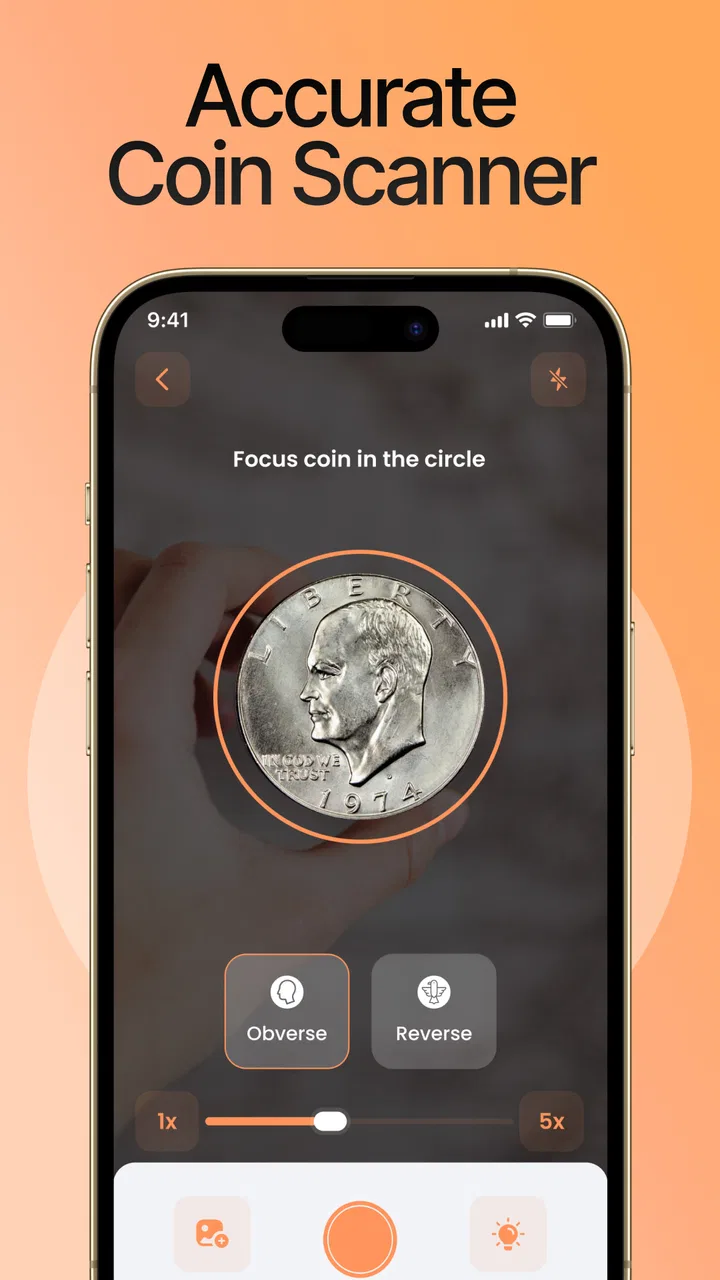
CoinIn – Coin Scan Identifier
- 4.5
- Rating
- 1.00M
- Installs
- Free
- Price

 Analysis by App-foxy
I tried CoinIn as a practical tool for looking at coins rather than as a replacement for a professional appraisal. That distinction matters. The app is built by PlantIn, sits in the tools category, and focuses on identifying foreign and potentially rare coins, estimating their value, and helping users keep track of a collection. In everyday use, I found the idea appealing because a drawer full of unfamiliar coins is difficult to sort with ordinary web searches. A camera-based starting point can make that first step much easier.
CoinIn is free to install and is rated for Everyone, so it is approachable for casual users, families, and collectors who want to experiment without committing immediately. Its current version is 1.19.0, and it runs on Android 8.0 or later. The app has reached over one million installs, with an average rating of 4.5 from around twenty-nine thousand ratings. Those figures suggest that the basic concept has found a substantial audience, although popularity alone should not be treated as proof that every identification or valuation will be correct.
What CoinIn is really useful for
The strongest use case is sorting and researching a mixed group of coins. Imagine coming home with coins from several trips, receiving an inherited jar, or finding an unfamiliar piece at a flea market. Instead of opening separate searches for the portrait, date, lettering, and denomination, I can use the app as a first-pass organizer. The result is most useful when it narrows the possibilities and gives me a sensible direction for further checking.
You May Also Like

 Blood Strike: 2.5 Anniversary
Blood Strike’s Loadouts Turn Every Drop Into a Tactical Gamble
A close look at Blood Strike’s custom loadouts: how fast access to signature weapons reshapes its battle royale rhythm, rewards preparation, and narrows the gap between fights.

 Pandora - Music & Podcasts
Pandora’s Music Is Easy to Start, but Harder to Recover
Pandora’s strength is its low-effort path from a seed to a station. Its weak spot is how much confidence it asks you to place in connection, setup, and quiet recovery.

 8 Ball Pool
 Is Built on Rivalries, Rematches, and Routine
A close look at the rivalries, rematches, shared routines, and unanswered safety questions that turn a quick pool match into a persistent mobile community.

 Samsung Music
’s Quiet Strength Is Playing What You Already Own
Its reach comes less from spectacle than from dependable access to a personal library. That simplicity is both the app’s strongest retention engine and its ceiling.

 AccuWeather: Weather Radar
AccuWeather Review: A Quick, Clear Forecast for Everyday Decisions
For everyday plans, the best forecast is the one you can understand quickly. AccuWeather makes rain timing, radar, and local conditions easy to act on, with a few trade-offs.

 Hill Climb Racing
Why Hill Climb Racing Still Turns Crashes Into One More Run
A tiny car, a bumpy hill and one more upgrade: Hill Climb Racing keeps resurfacing because its simple chaos makes every near-miss feel personal.
More From Our News Desk



I would not treat a scan as a final answer about authenticity or market price. Coins can look nearly identical while differing in mint mark, metal composition, edge design, condition, or production error. A phone camera may also struggle with worn lettering, reflections, unusual angles, and coins photographed against a busy background. My practical approach is to use CoinIn to create a shortlist, then inspect the details myself before making a purchase, sale, or insurance decision.
The collection angle gives the app a purpose beyond one-off identification. A person who collects casually can use it to bring order to scattered finds, while a more serious collector may appreciate having a mobile reference point when examining a new coin away from home. The value is not just in recognizing an object; it is in turning an unstructured pile into something that can be reviewed, compared, and followed over time.
Starting with a careful scan
Good input makes a noticeable difference with any visual identifier, and CoinIn is no exception. I get better results when the coin fills most of the frame without being cropped, the surface is evenly lit, and the camera is held parallel to the face. Harsh reflections can hide lettering and relief, so indirect light is preferable to a bright lamp pointed straight at the metal.
I also recommend photographing both sides whenever the app allows the workflow. One side may show a familiar portrait, but the reverse often carries the denomination, date, mint mark, or national symbol needed to separate similar issues. If the first result seems too confident for a blurry image, I would rescan rather than accept it immediately. A clean second image is often more valuable than spending time trying to interpret an uncertain first result.
There is a useful habit here that casual users may overlook: keep the original coin beside the phone while reviewing the result. It is easy to confuse a visually similar listing when several coins share a monarch, emblem, or script. Comparing the result with the actual edge, date, and lettering helps prevent a plausible-looking but incorrect match from becoming part of the collection.
Value estimates need context
The promise of checking a coin’s value is attractive, but value is not a single permanent number. Condition, demand, rarity, metal, provenance, and the difference between an asking price and a completed sale can all change the outcome. I see CoinIn’s value information as a research prompt, not as a guaranteed offer.
This is especially important for damaged or heavily circulated coins. A rare date in poor condition may be worth much less than an attractive example, while an apparent error may require specialist confirmation. Before listing anything for sale, I would compare the identified details with reputable numismatic references and look at actual market activity rather than relying on one displayed estimate.
The app is therefore best for answering questions such as “What might this be?” and “Is this worth investigating further?” It is less suitable for answering “Exactly how much will a dealer pay today?” That second question requires physical inspection and market knowledge that a camera-based tool cannot reliably replace.
Organizing a collection without creating extra work
A collection tracker is only helpful if it reduces friction. I would use CoinIn immediately after scanning a coin, while the country, date, and source are still fresh. Adding pieces in batches later makes it easier to forget where they came from or whether two similar examples are duplicates.
For a household collection, a simple routine works well: scan the coin, verify the visible details, save it under a consistent name, and add a short personal note if the app provides a suitable place for that information. Notes such as “from a family trip” or “needs a closer look at the mint mark” are more useful than relying on memory. They turn the collection from a catalogue into a record of why each item matters.
I would avoid treating the tracker as an investment ledger unless its available fields genuinely support that purpose. A personal purchase cost, storage location, insurance value, and sale history are different kinds of information. If the app does not make those distinctions clear, a separate private record may still be necessary for valuable holdings.
Trust begins with visible choices
Because CoinIn handles images of personal objects and may be used around a valuable collection, I pay attention to the moments when the app asks for access or presents a paid option. I prefer to grant camera access only when I am actively scanning, and I review any other request in the context in which it appears rather than approving everything automatically.
That approach is not an accusation against PlantIn or a claim about practices that are not visible in the app experience. It is simply sensible hygiene for any camera-based tool. A coin photo may seem harmless, but images can include a desk, documents, labels, or other objects in the background. I keep the frame tight and avoid capturing anything unrelated to the coin.
It is also worth distinguishing identification from account convenience. If the app offers collection features that require an account, I would decide whether synchronization is important enough to justify creating one. If I only want to identify a few coins, I would first explore the basic path and read each screen carefully. If I am building a long-term catalogue, I would want to understand how sign-in, recovery, deletion, and collection access work before investing substantial time.
Paid features and user control
CoinIn is free, but in-app purchases range from $4.99 to $59.99 per item. That broad range makes it important to slow down at payment screens and identify exactly what a particular purchase unlocks, whether it is recurring or one-time, and whether the feature is genuinely useful for my collecting habits. I would not subscribe merely because a scan produces an uncertain answer or because a prompt appears before I have tested the free experience.
For someone identifying a handful of inherited coins, a paid plan may be unnecessary. For a user who scans frequently and relies on the collection workflow, the calculation may be different. The right choice depends on how often the app is used and whether its additional tools save enough time to justify the expense. I appreciate having a free entry point, but I would like every upgrade screen to make the limits and billing terms unmistakable.
Parents should also remember that an Everyone age rating describes broad suitability, not a guarantee that a child will understand purchase prompts or camera choices. If a child is using the app to explore a family collection, I would supervise the first sessions, keep payment approval protected on the device, and explain that an automated identification is a starting point rather than a fact.
Where the app can mislead an enthusiastic collector
The most important limitation is the gap between visual similarity and numismatic certainty. Old coins may have worn surfaces, obscure scripts, unusual patinas, or damage that changes their appearance. A scan can still return a convincing match because the general design is recognizable, even when the exact issue is different. I would always check the date, denomination, country, mint mark, and edge before filing a result as confirmed.
Lighting is another source of friction. A shiny coin can produce bright spots that erase relief, while a dark background can make the camera expose the metal poorly. Cleaning the coin is not a good solution: aggressive cleaning can damage a collectible and reduce its appeal. Instead, I would change the angle, use softer light, and photograph the piece on a plain surface.
There is also a trade-off between convenience and expertise. CoinIn is faster than manually searching every visual clue, but a specialist forum, local coin club, or professional dealer may be better for authentication, grading, rare errors, and high-value pieces. The app is not the wrong tool because it has limits; it is the wrong tool only when the user expects a preliminary scan to carry the weight of an expert examination.
How it compares with ordinary alternatives
Manual web searching remains useful when I already know the country and denomination. It can provide deeper historical context and a wider range of references, but it is slower and easy to derail with vague descriptions. CoinIn’s advantage is the quick visual starting point: it helps turn “a coin with a person on it” into a more focused research question.
A spreadsheet or notebook is still better for detailed collection management. I can build columns for purchase price, storage box, condition, provenance, duplicates, and sale history without being limited by an app’s design. The downside is that manual systems do not identify the coin for me. I see CoinIn and a spreadsheet as complementary for a serious collection: the app for discovery, the personal record for decisions that need more detail.
Specialist catalogues and expert communities remain stronger when precision matters. They may require more knowledge and effort, but they are better suited to comparing varieties and understanding grading language. My preferred workflow is to use CoinIn for triage, then move important pieces to specialist references. That gives me speed without pretending that speed equals certainty.
Who should use it, and who should skip it
I would recommend CoinIn to travelers, families sorting inherited coins, beginners who do not know where to start, and casual collectors who want a more organized way to explore foreign currency. It is particularly helpful when the main problem is recognition rather than formal valuation. The collection function can also make a hobby feel more manageable by giving scattered discoveries a central place.
I would be more cautious about recommending it to dealers, advanced collectors, or anyone buying a supposedly rare coin based only on a phone result. Those users need repeatable identification, detailed variety references, condition assessment, and a clear audit trail. A general-purpose scanning tool may save time, but it should not become the sole basis for a financial decision.
I would also skip it if I only want a static reference book and do not enjoy camera-based experimentation. Manual catalogues can be less distracting and more transparent for learning the history behind a coin. CoinIn makes the first step easier, but it does not remove the need to learn what separates a common issue from a genuinely scarce one.
My cautious verdict
After using CoinIn as a discovery and organizing tool, I think its best quality is practical momentum. It gives a beginner somewhere to start and can make a mixed collection feel less intimidating. The free installation, broad age rating, and large user base make it easy to try, while PlantIn’s focus on identification and collection tracking gives the app a clearer purpose than a generic camera search.
My recommendation comes with one firm rule: treat every result as a lead until the physical coin supports it. Keep images focused, check both sides, rescan poor photographs, and verify valuable or unusual pieces through specialist sources. Be equally deliberate with camera access, account screens, and in-app purchases. The best way to use CoinIn is with curiosity first and caution immediately afterward.
For a newcomer, that balance makes the app worthwhile. It can help answer the first questions, organize discoveries, and show which coins deserve deeper research. It cannot replace an experienced eye, a proper reference, or an independent valuation. If those limits match what you need, CoinIn is a useful companion for exploring a collection rather than a final authority on what every coin is worth.
FAQs for CoinIn – Coin Scan Identifier
01What is CoinIn – Coin Scan Identifier used for?
CoinIn – Coin Scan Identifier is designed to help users identify and gather information about coins. By scanning a coin using your smartphone camera, the app provides detailed descriptions, historical context, and estimated values. It's particularly useful for collectors and enthusiasts who want to learn more about their coins quickly and accurately.
02How accurate is the coin identification feature in CoinIn?
The accuracy of CoinIn's identification feature depends largely on the quality of the image and the clarity of the coin's details. The app uses advanced algorithms to match images with its extensive database. While it performs well with common and well-documented coins, rare or heavily worn coins might present challenges. Users can enhance results by ensuring clear images and good lighting.
03Is CoinIn – Coin Scan Identifier free to use?
CoinIn offers both a free version and a premium subscription. The free version includes basic identification features and limited scans per day. The premium version, available for a monthly or annual fee, offers unlimited scans, access to a broader database, and additional insights into coin values and history, making it ideal for serious collectors.
04Does CoinIn require an internet connection to function?
Yes, CoinIn requires an internet connection to access its database and provide real-time identification results. While some basic functions may be available offline, the app relies on its online resources for accurate and comprehensive identification. It is recommended to use the app where internet access is reliable for the best experience.
05Can CoinIn identify coins from all countries and eras?
CoinIn covers a wide range of coins from various countries and historical periods, but its database is continuously expanding. While it includes a vast number of commonly collected coins, some obscure or newly issued coins might not be immediately recognized. The app's developers regularly update the database to include more coins and improve recognition capabilities.
Pros
- User-friendly interface for quick navigation.
- Accurate coin identification with detailed info.
- Supports a wide variety of coin types.
- Offline mode for identification on the go.
- Regular updates with new coin additions.
Cons
- Limited to coins
- no other collectibles.
- In-app ads can be intrusive and distracting.
- Requires premium for some advanced features.
- Occasional misidentification of rare coins.
- No direct social sharing features available.

CoinIn – Coin Scan Identifier
Gallery